Skip to product information
1 of 10

T2255MSC-B1

21.5-inch Full HD IPS touch monitor with optically bonded 10-point PCAP touch, MPP 2.0 stylus support and a flexible stand for retail, education and interactive use.

  • Optically bonded PCAP touch with 10 touchpoints and palm rejection
  • Active stylus support (MPP 2.0) with tilt for writing and annotation
  • Glass overlay keeps touch working even if the front is scratched
  • IPS panel with 178° viewing angles for shared counters and classrooms
  • Tilt stand from 15° up to 70° down, plus 100 x 100 mm VESA mounting
  • SKU:4948570121625
  • GTIN:4948570121625
  • MPN:T2255MSC-B1

You need to login to view the price.

View full details
BRIGHTNESS360 cd/m²Typical
VESA MOUNT100 x 100 mmVESA
ORIENTAIONLandscapeMounting

21.5-inch Full HD optical-bonded 10-point touch monitor with stylus support

iiyama T2255MSC-B1

The iiyama ProLite T2255MSC-B1 is a 21.5-inch Full HD touch monitor built for counters, classrooms, reception desks and creative workstations where people interact directly with the screen. It combines an IPS panel with a ten-point projected capacitive touch layer bonded to edge-to-edge glass, so the surface feels smooth and responds to fingers, gloved hands and an active pen. Its 10-point touch and stylus support make it suited to shared point-of-sale terminals, self-service information points, teaching displays and annotation or sketching work. The main benefit for end users is a touch surface that is easy to read from wide angles and holds up to everyday contact, with a stand that can be adjusted for a comfortable working position.

Optically Bonded 10-Point Touch Surface

Optically Bonded 10-Point Touch Surface

The touch sensor is a sensor grid of fine wires integrated into the glass covering the screen, and the monitor is specified with 10 touchpoints, palm rejection and a touch accuracy of ±2 mm. It registers a bare finger, a latex-gloved finger and a stylus, which matters in hygiene-sensitive or outdoor-adjacent settings where gloves are common. For a POS terminal, an information kiosk or a classroom board, several people can use the surface at the same time without a separate pen or special gloves. The manufacturer also states that the touch function remains unaffected even if the glass is scratched, which suits public installations where the front gets handled roughly. Multi-touch depends on a supported operating system and on the USB link to the PC, so that combination should be confirmed before a deployment.

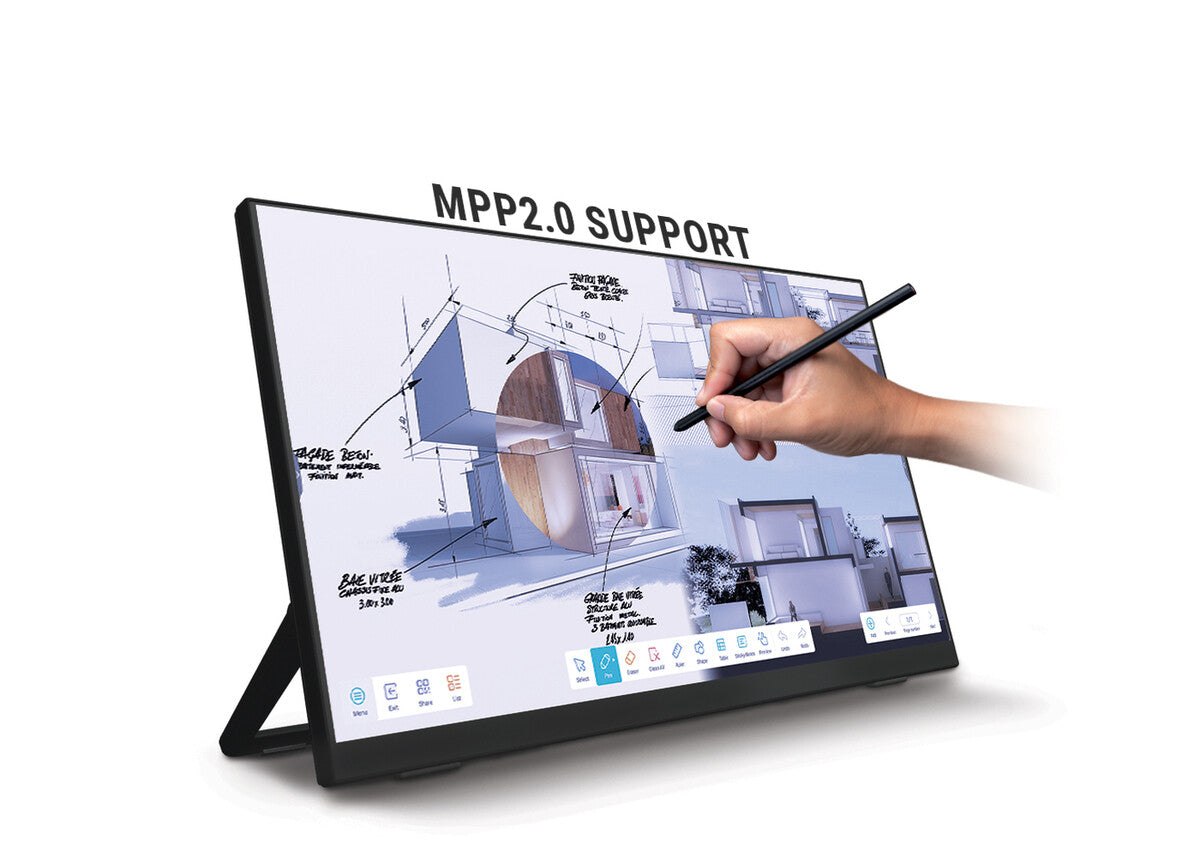
Active Stylus Support with Tilt (MPP 2.0)

Active Stylus Support with Tilt (MPP 2.0)

The monitor supports the Microsoft Pen Protocol 2.0 for digital pens and styluses that are compatible with the protocol. The pen can write, draw and navigate on the screen, and tilt detection lets the user change line thickness and angle by tilting the pen. This turns the display into a practical tool for note-taking in teaching, mark-up during design reviews, or signature and annotation tasks at a counter. For the end user, the writing experience is more natural than a finger, because the pen tip is precise and the tilt response mimics a traditional marker. The pen itself needs to be MPP-compatible, so buyers should check the stylus they plan to supply.

10 touchpoints. MPP 2.0 pen. 7H glass front.

Touch works with latex gloves · 3-year manufacturer warranty (Bechtle listing)

Wide-Angle IPS Viewing for Shared Screens

Wide-Angle IPS Viewing for Shared Screens

The IPS panel is specified at 178° horizontal and 178° vertical viewing angles, with 89° to each side. Colour and contrast stay consistent when several people look at the screen from different positions, such as a customer and a shop assistant at the same counter, or a whole row of students. The panel's 400 cd/m² rating drops to 360 cd/m² with the touch layer active, which is indoor-grade brightness. The monitor therefore fits shop counters, meeting rooms and classrooms with controlled lighting, but it is not designed for sunlit shop windows, where a high-brightness display would be the better choice.

Flexible Stand and VESA 100 x 100 Mount

Flexible Stand and VESA 100 x 100 Mount

The integrated stand tilts from 15° up to 70° down, so the screen can be angled for a seated user at a desk or a standing user at a counter. A 100 x 100 mm VESA pattern allows the monitor to go on a wall arm or a compatible stand when the stand base is not wanted. The unit weighs 3.2 kg without packaging and measures 493.5 x 289.5 x 48.5 mm, which keeps mounting manageable for a single installer. The official material does not state orientation support, and one reseller lists landscape only, so portrait mounting should be confirmed before installation.

Built-In USB Hub and Single-Cable Touch Link

Built-In USB Hub and Single-Cable Touch Link

The monitor includes a USB hub with two downstream ports at USB 3.2 Gen 1 (5 Gbps, 900 mA each), and the touch interface uses a USB connection to the PC. In practice, the installer runs one USB cable from the PC for touch plus a video cable, and the hub can serve peripherals such as a keyboard or card reader on the front of the screen. The manufacturer's FAQ notes that touch will not work unless the supplied USB cable is connected between PC and monitor, so this is the first thing to check when an end user reports a dead touch layer. The monitor also offers HDMI and DisplayPort inputs.

Anti-Fingerprint Coating for Public Use

Anti-Fingerprint Coating for Public Use

The front has an anti-fingerprint coating, which the manufacturer says reduces static and the visibility of dirt, dust and fingerprints on the glass. On a shared terminal this means the screen looks clean for longer between wipes, which helps the customer experience. The manufacturer also warns against paper towels, abrasive cloths, harsh cleaning agents and spraying liquid directly onto the screen, as these can damage the touch sensors. Staff should be given these cleaning rules when the display goes live.

Display26 specifications
Display diagonal54.5 cm (21.5")
Native resolution1920 x 1080 @60 Hz (2.1 megapixel Full HD)
Aspect ratio16:9
PanelIPS
Panel brightness400 cd/m²
Brightness360 cd/m² with touch
Light transmittance90%
Static contrast1000:1
Response time (GTG)5 ms
Viewing zoneHorizontal/vertical: 178°/178°, right/left: 89°/89°, up/down: 89°/89°
Horizontal Sync30 - 83 kHz
Refresh rate60 Hz
Viewable area W x H478.7 x 260 mm, 18.8 x 10.2"
Pixel pitch0.249 mm
Screen typeFlat
Glass hardness7H
Touch technologyOptical bonding PCAP
Touch points10 (HID, only with supported OS)
Touch accuracy+- 2 mm
Touch methodStylus, finger, glove (latex)
Touch interfaceUSB
Palm rejectionYes
Touchscreen technologyProjected capacitive system
Response time measurement typeGTG (Gray to Gray)
Viewable size, horizontal47.9 cm
Viewable size, vertical26 cm
Ports & interfaces6 specifications
Digital signal inputHDMI x1, DisplayPort x1
Audio outputMini jack x1
USB hubx2 (3.2 Gen 1 (5Gbps, DC5V, 900mA))
USB hub version3.2 Gen 1
USB Type-A downstream ports quantity2
Built-in USB hubYes
Audio2 specifications
Built-in speakersYes
Speakers2 x 3 W
Design12 specifications
DesignEdge to edge glass
Product colourBlack
Bezel colour and finishBlack, matte
Tilt angle15° up; 70° down
VESA mounting100 x 100 mm
Pivot functionNo
ConvenienceKensington-lock™ prepared
Control buttonsJoystick: right / menu / enter, left / input / exit, up / eco, down
OSD key lockYes
OSD languagesEN, DE, FR, ES, IT, PT, RU, JP, NL, PL
User controlsPicture adjust (brightness, contrast, i-Style Color, adv. contrast, ECO, OverDrive, X-Res technology), color settings (gamma, RGB range, color temp.), image settings (video mode adjust, blue light reducer, sharp and soft), OSD (horizontal pos., vertical pos., OSD time, OSD background, language, display information), extra (reset, DDC/CI, signal select, volume, mute, opening logo, led, touch switch)
Extraanti-fingerprint coating, MPP2.0
Performance7 specifications
Plug and PlayDDC2B
Blue light reducerYes
Flicker-free technologyYes
MTBF50000 hours (excluding backlight)
Supported operating systemsAll iiyama monitors are Plug & Play and compatible with Windows and Linux. For details regarding the supported OS for the touch models, please refer to the driver instruction file available in the downloads section.
NVIDIA G-SYNCNo
AMD FreeSyncNo
Power9 specifications
Power supply unitInternal
Power supplyAC 100 - 240 V, 50/60 Hz
Power consumption (typical)16 W
Power consumption (standby)1.5 W
Power consumption (off)0.3 W
Energy efficiency class (Regulation (EU) 2017/1369)D
Energy efficiency class rangeA - G
Energy consumption (SDR) per 1000 hours12.4 kWh
Energy efficiency class (HDR)Not available
Weight & dimensions5 specifications
Product dimensions W x H x D493.5 x 289.5 x 48.5 mm
Weight (without box)3.2 kg
Weight with stand3.20 kg
Width (with stand)493.5 mm
Height (with stand)289.5 mm
Packaging content1 specification
Cables includedPower (1.8 m), USB (1.5 m), HDMI (1.5 m)
Certificates2 specifications
RegulationsCE, TÜV-Bauart, EAC, RoHS support, ErP, WEEE, REACH
REACH SVHCAbove 0.1%: Lead
Other features5 specifications
Manufacturer's warranty3-year on-site or exchange service (see manufacturer's website for details)
EAN code4948570121625
Width493.5 mm
Height289.5 mm
Mean time between failures (MTBF)50000 h
Multimedia1 specification
RMS rated power6 W
Ergonomics5 specifications
Cable lock slotYes
Tilt angle range-15 - 70°
On Screen Display (OSD)Yes
On Screen Display (OSD) languagesGerman, English, Spanish, French, Italian, Japanese, Dutch, Polish, Portuguese, Russian
Tilt adjustmentYes
Sustainability1 specification
Sustainability certificatesErP
Algemeen1 specification
ProductfamilieProLite
Touchscreen4 specifications
TouchscreenYes
Display technologyLCD
USB Touch portYes
HDMIYes

Specifications are checked against the manufacturer's documentation where available.