Skip to product information
1 of 21

T2452MSC-W1

24-inch Full HD IPS touchscreen monitor with 10-point projected-capacitive touch behind edge-to-edge glass, aimed at interactive signage, retail and POS.

  • 10-point projected-capacitive touch that works with bare fingers, gloves or a stylus
  • Edge-to-edge glass with 7H hardness and anti-fingerprint coating for public use
  • IPS panel with 178/178 degree viewing angles for multi-user counters and displays
  • Built-in 2 x 1 W stereo speakers and two USB 3.2 Gen 1 downstream ports
  • 100 x 100 mm VESA mounting, cable management and Kensington lock slot
  • Low standby and off-mode power draw with EU energy class E
  • SKU:4948570122066
  • GTIN:4948570122066
  • MPN:T2452MSC-W1

You need to login to view the price.

View full details
BRIGHTNESS360 cd/m²Typical
VESA MOUNT100 x 100 mmVESA
ORIENTAIONLandscapeMounting

24-inch 10-point touch monitor for signage and POS

iiyama T2452MSC-W1

The iiyama ProLite T2452MSC-W1 is a 24-inch Full HD touchscreen monitor for interactive signage, in-store retail, point-of-sale and interactive presentations. Its 10-point projected-capacitive touch sits behind an edge-to-edge glass front, and the IPS panel keeps colour consistent for several viewers. It suits information points, self-service counters and collaborative meeting areas where a compact, touch-enabled display is needed. The white chassis and flexible tilt stand are aimed at neat desk and counter installations. iiyama lists this model as end-of-life and replaced by the ProLite T2452MSC-W2AG.

10-Point Touch Behind Glass

10-Point Touch Behind Glass

The T2452MSC-W1 uses projected-capacitive sensing with 10 touch points and a stated touch accuracy of +-2 mm. The sensor grid is built into the glass that covers the screen, and it responds to a bare finger, a latex-gloved hand or a stylus. iiyama states the touch function stays unaffected even if the glass is scratched, which suits reception desks, POS terminals and information points where the surface is handled all day. The OSD offers a Glove touch switch that supports an extra 2 mm of glove thickness, useful where staff work with gloves on. Touch runs over USB to the host PC, and gesture support depends on the operating system: the manual lists Windows versions with digitizer support, while Mac OS and Android are not supported for touch. Confirm the OS before promising multi-touch gestures to a customer.

Edge-to-Edge Glass With 7H Hardness

Edge-to-Edge Glass With 7H Hardness

The front is a single edge-to-edge glass panel with a 7H surface hardness and a nano anti-fingerprint coating. The coating is meant to reduce dirt and fingerprints on the screen and to keep the displayed image clear, and the glass overlay is the scratch-protection layer iiyama positions for schools and public places. For the end user this helps the front look presentable at a shop counter or lobby screen over time. Care still matters: the manual forbids alcohol, disinfectants, abrasives and wet or paper tissues on the screen, and asks users to wipe with a dry, soft cloth and never leave the touch surface wet. Setting these rules at handover helps avoid damage to the coating and touch surface.

10-point touch behind glass. Built for POS and interactive signage.

Minimum 3-year general guarantee · EU energy class E · EOL, successor W2AG

IPS Panel for Wide Viewing Angles

IPS Panel for Wide Viewing Angles

IPS technology gives 178 degree horizontal and vertical viewing angles and approximately 16.7 million colours at 1920 x 1080. In practice the picture keeps its colour and contrast when seen from the side, which matters for interactive tables and reception screens where several people stand at different positions. The Full HD resolution suits menus, catalogues, forms and presentation content, but it is not a high-density panel for fine detail at close range. The active display area is 527 x 296.5 mm with a 60 Hz maximum refresh rate, and the response time is 5 ms gray-to-gray when OverDrive is set to 5.

360 cd/m2 With Touch: Indoor Use

360 cd/m2 With Touch: Indoor Use

With the touch layer fitted, the rated brightness is 360 cd/m2, against 400 cd/m2 for the bare panel, with 1000:1 static contrast and 90% light transmittance. That is an indoor figure: it suits reception areas, shop interiors and meeting rooms, but it is not a sunlight-readable specification. A screen placed in a window with direct sun or behind a shop window will look washed out. For end users the practical advice is to position the monitor away from direct sunlight and to fine-tune the Brightness and Blue Light Reducer settings for the room.

VESA 100 x 100 mm, Landscape Only

VESA 100 x 100 mm, Landscape Only

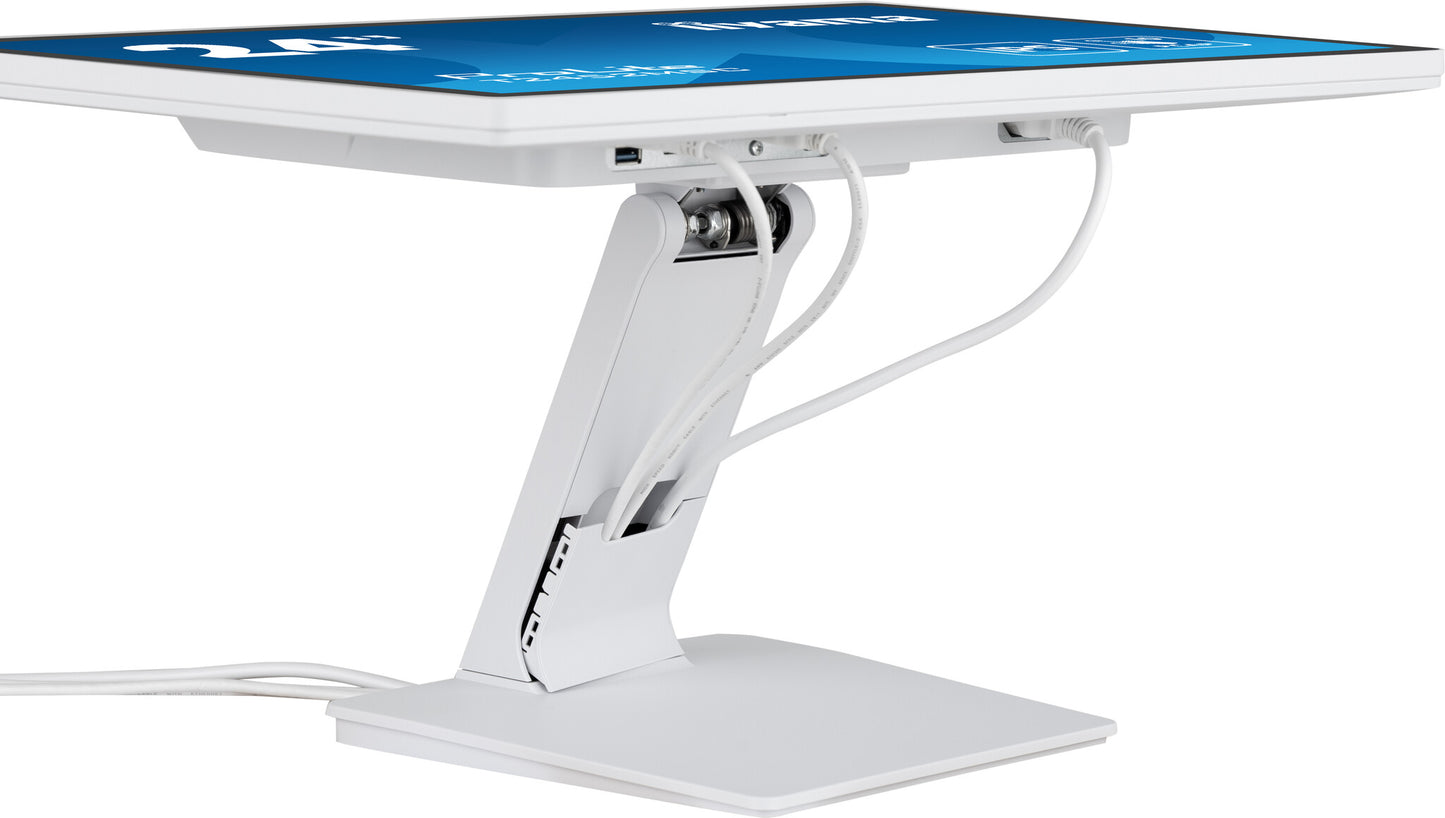
The rear has a 100 x 100 mm VESA pattern, so the screen can go on standard wall or arm mounts, and a cable management system routes cables through the stand neck. Installers should note that iiyama states the monitor is designed for landscape mode only, and portrait is not available. The manual asks for M4 screws with an 11 mm length when wall mounting, because longer screws can reach live parts inside the chassis. The stand tilts 90 degrees up and 5 degrees down with no height adjustment, so the mounting position has to be planned for eye level. A Kensington lock slot and a keyhole for a security lock help secure the unit in public areas.

Low Standby and Off-Mode Consumption

Low Standby and Off-Mode Consumption

The monitor carries EU energy class E, with 18 W typical consumption and 0.3 W in off mode. The EU product information sheet gives 0.7 W standby, while iiyama's product page and manual state up to 1.5 W standby; the EU figure is used in the specification table. When no video signal is present the monitor drops into standby, and the power LED turns orange. For a display left running in a reception area or shop, the operating draw and standby behaviour drive running cost. The EPREL registration number is 1545216.

Plan Around the 24/7 Limit

Plan Around the 24/7 Limit

iiyama states this product is not specifically designed for 24/7 usage in all environments, and the manual recommends unplugging it during long periods of non-use. A menu screen running around the clock in a lobby is a different duty cycle from an intermittent kiosk, so agree the operating hours with the customer before the install. Keep at least 10 cm of clearance from walls for ventilation and check that the location stays within the 5 to 35 degree C operating range. The model is also listed as end-of-life and replaced by the ProLite T2452MSC-W2AG, so confirm the successor's specifications before quoting multi-unit projects.

Display43 specifications
Display diagonal60.5 cm (24")
Native resolution1920 x 1080 pixels
Panel typeIPS
Panel technology usedLED LCD
Panel brightness400 cd/m²
Brightness360 cd/m² with touch
Static contrast1000:1 with touch
Light transmittance90%
Response time5 ms
Maximum refresh rate60 Hz
Vertical sync frequency55-76 Hz
Horizontal Sync30 - 83 kHz
Colour support16.7 million colours
Pixel pitch0.275 mm
Viewable area W x H527 x 296.5 mm
Viewing zone178°
Viewing angle, vertical178°
Screen shapeFlat
Glass hardness7H
Touch technologyMulti-touch
Touch points10 (HID, only with supported OS)
Touch accuracy+- 2 mm
Touch methodStylus, finger, glove (latex)
Touch interfaceUSB
Palm rejectionYes
Electronic display categoryMonitor
Size ratio16 : 9
Visible screen area15,6 dm²
Size Category23.8"
Brightness (default / energy saving)280 cd/m²
Viewable angleRight / Left : 89 degrees each, Up / Down: 89 degrees each (Typical)
Response time (typical)14 ms
Maximum Resolution1920 × 1080, 2.1 MegaPixels
Input Video SignalHDMI, DisplayPort
Maximum Screen Size527.04 mm W × 296.46 mm H / 20.7" W × 11.7" H
Voice recognition sensor availableNo
Room presence sensor availableNo
Response time measurement typeGTG (Gray to Gray)
Colour depth8 bit
Positional accuracy2 mm
Contrast ratio (typical)1000:1
Viewable size, horizontal52.7 cm
Viewable size, vertical29.6 cm
Ports & interfaces11 specifications
Digital signal inputHDMI x1, DisplayPort x1
HDMI ports quantity1
DisplayPort quantity1
HDCPYes
USB hubx2 (v.3.2 (Gen 1, 5Gbit))
USB standardUSB3.2 Gen 1 (5Gbps, DC5V, 900mA)
USB downstream ports2 (Series A)
USB upstream port1 (Series B)
Headphone connectorø 3.5 mm mini jack (Stereo)
Built-in USB hubYes
USB hub version3.2 Gen 1 (3.1 Gen 1)
Audio3 specifications
Built-in speakersYes
Speakers1 W × 2 (Stereo speakers)
RMS rated power2 W
Design4 specifications
Product colourWhite
Front bezel colourWhite
Bezel colour and finishWhite, matte
DesignEdge to edge glass
Performance8 specifications
Flicker freeYes
Blue light reducerYes
NVIDIA G-SYNCNo
AMD FreeSyncNo
Plug&PlayDDC2B
Adv. contrast functionAvailable
Compatible operating systemsAll iiyama monitors are Plug & Play and compatible with Windows and Linux. For details regarding the supported OS for the touch models, please refer to the driver instruction file available in the downloads section.
MTBF50000 hours (excluding backlight)
Power12 specifications
Energy efficiency class (SDR)E
Energy efficiency class (HDR)Not available
On mode power demand (SDR)15.4 W
Energy consumption (SDR) per 1000 hours15.4 kWh
Power consumption (typical)18 W
Power consumption (standby)0.7 W
Power consumption (off)0.3 W
Power supply typeInternal
Power supply100 - 240 V
AC input frequency50/60 Hz
Power source100-240VAC, 50/60 Hz, 0.8A
Automatic Brightness Control (ABC)No
Weight & dimensions4 specifications
Width (with stand)567 mm
Depth (with stand)253.5 mm
Height (with stand)385 mm
Weight (with stand)5.6 kg
Packaging data5 specifications
Package width635 mm
Package depth143 mm
Package height405 mm
Package weight7.2 kg
Quick start guideYes
Packaging content6 specifications
CablesPower (1.8 m), USB (1.5 m), HDMI (1.5 m)
Power cable length1.8 m
USB cable length1.5 m
HDMI cable length1.5 m
GuidesQuick start guide, safety guide
Accessories includedStand-neck with screws, stand-base, thumb screws for stand-base fixing (2 pcs), screwdriver
Operational conditions5 specifications
Operating temperature5 to 35°C / 41 to 95°F
Operating humidity10 to 90% (No condensation)
Storage temperature-20 to 60°C / -4 to 140°F
Storage humidity10 to 90% (No condensation)
24/7 usageNot specifically designed for 24/7 usage in all environments
Certificates4 specifications
Compliance certificatesCE, TÜV-Bauart, EAC, RoHS support, ErP, WEEE, REACH, UKCA, cTUVus
EPREL registration number1545216
REACH SVHCAbove 0.1%: Lead
ApprovalsCE, UKCA, TÜV-Bauart, cTÜVus, EAC
Other features25 specifications
Product seriesProLite
Product statusEOL, replaced by ProLite T2452MSC-W2AG
Control buttonsMenu, scroll up / ECO, scroll down / volume, select / input, power
OSD languagesEN, DE, FR, ES, IT, PT, RU, JP, NL, PL
OSD key lockYes
Touch switchOff (normal touch) / Glove
Power indicatorBlue: normal operation; Orange: standby mode
Kensington lockCable lock slot type Kensington; Kensington-lock prepared
Cable management systemYes
VESA mounting100 x 100 mm
Tilt angle90° up; 5° down
Height adjustmentNo
Extraanti-fingerprint coating
Minimum general guarantee3 Years
Minimum guaranteed spare parts availability7 Years
Minimum guaranteed product support7 Years
Minimum guaranteed software and firmware updates8 Years
Cable coverYes
User controlsPicture adjust (brightness, contrast, i-Style Color, adv. contrast, ECO, OverDrive, X-Res technology)
Standby FeatureYes
Keyhole for Security LockYes
Digital Character SmoothingYes
Packaging contentScrewdriver
Mean time between failures (MTBF)50000 h
EAN4948570122066
Ergonomics6 specifications
Cable lock slotYes
Cable lock slot typeKensington
Tilt angle range-25 - 90°
On Screen Display (OSD)Yes
On Screen Display (OSD) languagesGerman, English, Spanish, French, Italian, Japanese, Dutch, Polish, Portuguese, Russian
Tilt adjustmentYes
Sustainability1 specification
Sustainability certificatesErP
Touchscreen8 specifications
TouchscreenYes
HD typeFull HD
Native aspect ratio16:9
Display technologyLCD
Built-in cameraNo
Touchscreen typeMulti-user
USB Touch portYes
HDMIYes

Specifications are checked against the manufacturer's documentation where available.